LAUNCH PROMO
Next price: $249
The price will be rise to limit the number of users for this strategy
The "Trend BtD" Expert Advisor is a representative of robots trading breakout levels. Levels built automatically.
The uniqueness of the advisor is that it work WITHOUT averaging and using the martingale principle.
ALL orders have StopLoss and TakeProfit.
VERY IMPORTANT: Always load SET Files for each pair! Adjust Lot size to yours deposit!
HOW TO TEST:
1. Choose H1 TimeFrame
2. Load my SET files for symbol you want to test. How to load SET Files
3. Set Initial Deposit to 1000
4. Use Every Tick Method
Have problem with test? PM me
Timeframe is H1 .
Minimum account balance: $1000 for every 0.01 lot
Telegram group here
SET files here
Features:
- The EA is not sensitive to spread or broker, you may chose any broker you trust to
- Great resistance to unexpected market events
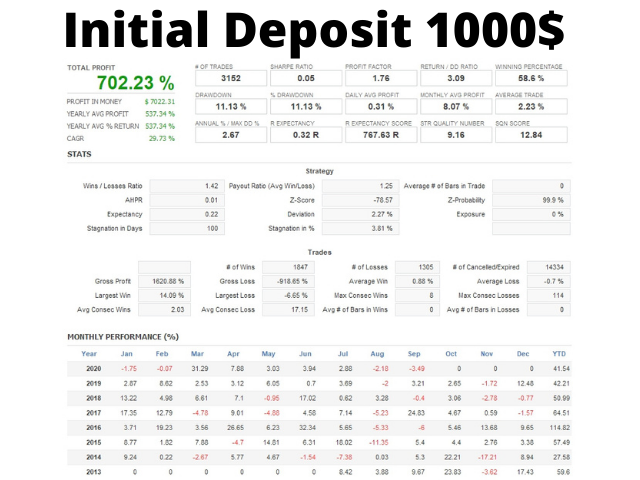
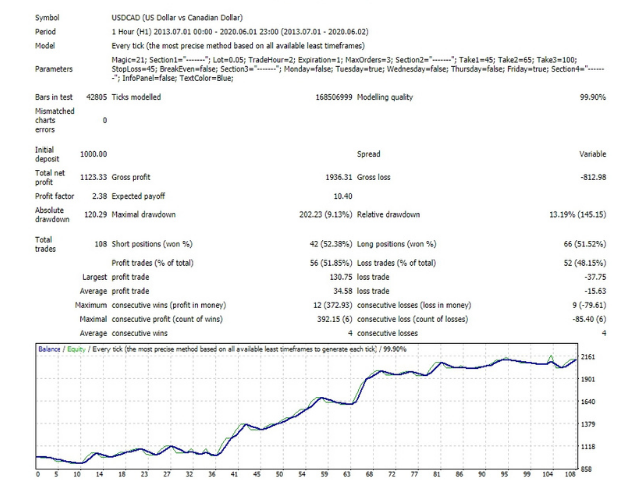
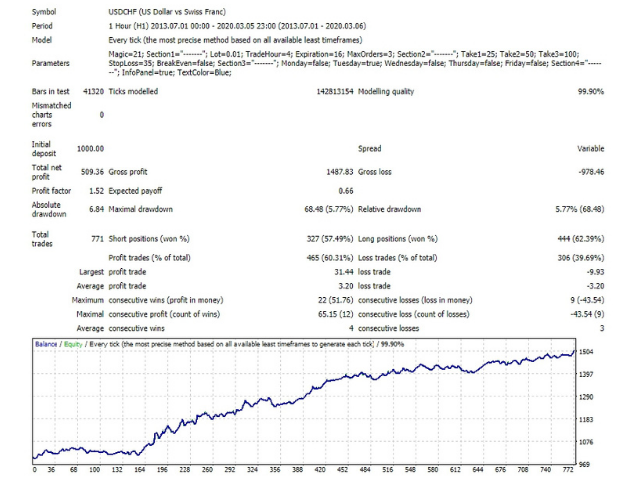
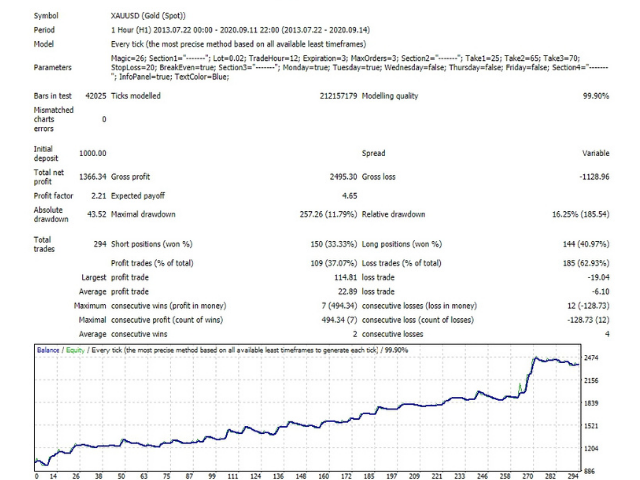
- Stress tested with 99.90% tickdata using variable spread for 7+ years
- The EA is very easy to setup and use
Settings:
- Magic – a unique number by which the robot determines its orders. Must be different on each chart.
- Lot – position size, how to choose it is described above in the section Managing
- TradeHour – hour in the broker’s time at which the robot will place pending orders
- Expiration – how many hours placed orders will wait for price activation
- MaxOrders – the number of orders, should take a value from 1 to 3
- TP1 – size as a percentage of the size of the candles of the previous day for calculating TakeProfit for order No. 1
- TP2 – the same for order No. 2
- TP3 – the same for order No. 3
- SL – size as a percentage of the size of the candles of the previous day for calculating StopLoss for all orders
- if TP BreakEven Others – if order No. 1 closed by Take, then transfer Stop for the remaining orders to breakeven.
- Days of the week – if TRUE, then the robot places orders on this day, if FALSE then the robot does not trade on this day of the week
- InfoPanel – whether to display the information panel on the chart.
- TextColor – the color of the text in the information panel.