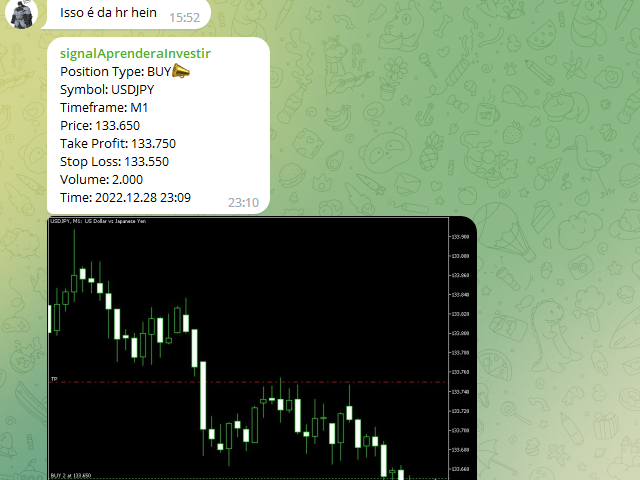
Send your trades on the Metatrader 5 platform to your Telegram Group!
Simple to use, just follow the steps below:
- Create a group in Telegram and enter the name in the robot parameters;
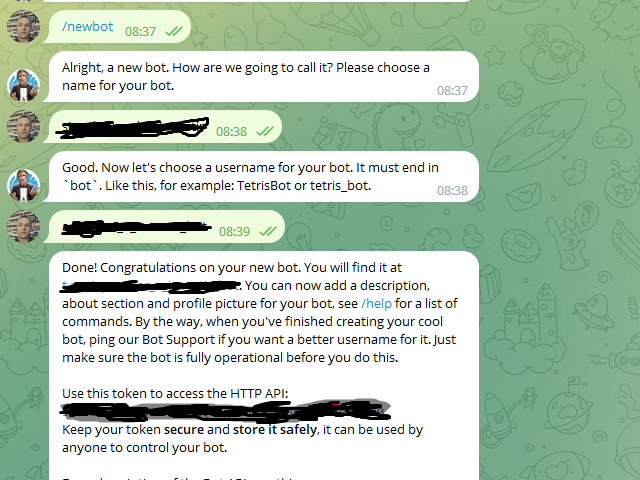
- Create a Bot in Telegram with the user BotFather:
- Send the following message-> /newbot;
- BotFather will ask for a name for your Bot;
- Send a message with the desired name;
- BotFather will ask for a username for your Bot;
- Send a message with the desired username;
- BotFather will send the Token;
- Insert the Token in the robot parameters;
Now the robot can be attached to the Active to send the signals, but to send the screen prints we need to get the Id of your Telegram group:
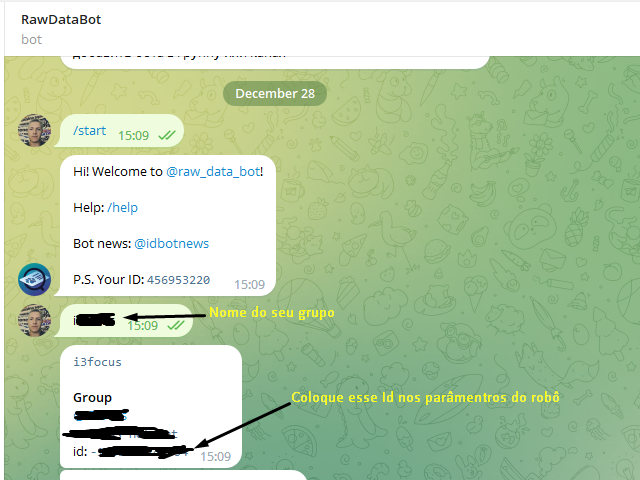
- Talk to Telegram user RawDataBot:
- Send the following message-> /start;
- Now send a message with the name of your telegram group;
- RawDataBot will respond with your group ID;
- Enter the ID in the robot parameters.
Support and questions about our products at the link below:
Edson Cavalca Junior
Systems Analyst